
Cannot connect to known wi-fi networks after waking up from standby


After waking up from standby mode, my Lenovo X200 laptop cannot connect to known Wi-Fi networks (both at home and office).

It uses Intel WiFi Link 5100 AGN card and Microsoft's driver with Windows 10 Build 10586.36.


I try setting the 802.11n Change Width for band 2,4 to Auto.
It works!
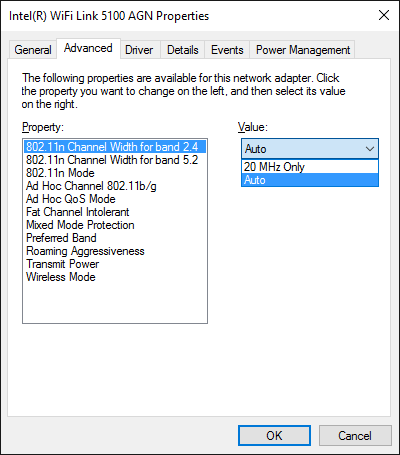

Set 802.11n Chanel Width for band 2.4 to Auto

Hope this will save you time if run into the same situation.

Be HAPPY!

Popular posts from this blog

Hydra: Notes

Hydra v9.1 (c) 2020 by van Hauser/THC & David Maciejak - Please do not use in military or secret service organizations, or for illegal purposes (this is non-binding, these *** ignore laws and ethics anyway).

WinRAR command

Examples: Compress four folders f:\z1 f:\z2 f:\z3 f:\z4 to one file f:\z.rar. "c:\Program Files\WinRAR\Rar.exe" a f:\z.rar f:\z1 f:\z2 f:\z3 f:\z4 F:\>"c:\Program Files\WinRAR\Rar.exe" RAR 5.61 x64 Copyright (c) 1993-2018 Alexander Roshal 30 Sep 2018 Trial version Type 'rar -?' for help Usage: rar - - a Add files to archive c Add archive comment ch Change archive parameters cw Write archive comment to file d Delete files from archive e Extract files without archived paths f Freshen files in archive i[par]= Find string in archives k Lock archive l[t[a],b] List archive contents [technical[all], bare] m[f] Move to archive [files only] p Print file to stdout r Repair archive rc Reconstruct missing volumes rn Rename archived ...